

How to Disable Comments and Lock Posts on Google+
People love the ability to express themselves, and social media has provided the technological vehicle for doing such. But, as with all great things, there are negative side affects. For social media fans, lack of privacy rights may hinder their involvement in new developments, such as Facebook Timeline or Google+. However, Google+ is taking the steps to assist its users with increase privacy by giving you the ability to disable comments and lock posts on Google+. The good news is that it’s simple to perform. The text and video below from Google Engineer Ebby Amirebrahimi details how to protect your right to privacy.
Video Transcript on How to Disable Comments and Lock Posts on Google+
Here is the video transcription of how to disable comments and lock posts on Google+ from Google engineer Ebby Amirebrahimi:
Hi! My name is Ebby and I’m an engineer on the Google+ Sharing team.
One of my favorite parts about Google+ is how circles help me control who I share things with. And if I want to go a step further, I can do things like disable comments, or lock my post to make sure no one reshares it.
We’ve heard from many of you that you want these disable and lock options before you share, not after. So today I’m happy to say that we’re doing exactly that. Let me show you how it works.
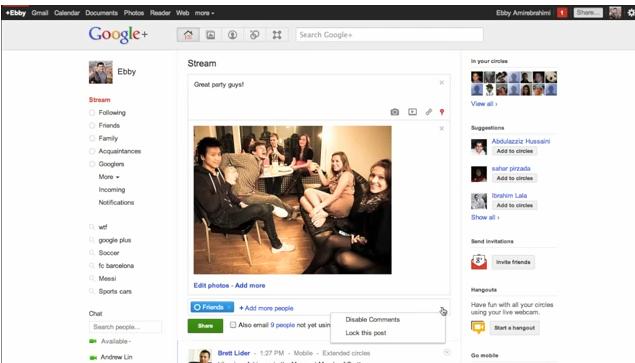
Say I want to share this picture from my friend’s party. As usual, I choose the circles I want to share with. But as I hover over the sharebox, you’ll notice I can now disable comments and lock the post — before sharing to the Stream.
We hope these features help you feel even more secure about sharing on Google+. We’ll keep listening, and rolling out more improvements in the coming weeks and months, so let us know what you think!
Click below to watch the video.